> ## Documentation Index
> Fetch the complete documentation index at: https://docs.infercom.ai/llms.txt
> Use this file to discover all available pages before exploring further.
# Blackbox AI Integration Guide
> Configure Blackbox AI VS Code extension with Infercom's EU sovereign inference. Use OpenAI-compatible API settings for GDPR-compliant AI coding assistance.
[Blackbox AI](https://www.blackbox.ai) is a VS Code extension for AI-powered coding assistance. It supports custom OpenAI-compatible API providers, allowing you to connect to Infercom's EU sovereign inference platform.
**Setup time:** \~2 minutes
## Prerequisites
* [VS Code](https://code.visualstudio.com/) installed
* [Blackbox AI extension](https://marketplace.visualstudio.com/items?itemName=Blackboxapp.blackbox) installed
* [Infercom API key](https://cloud.infercom.ai/apis)
## Configuration
### Step 1: Open Blackbox Settings
1. Open VS Code
2. Click the **Blackbox AI icon** in the sidebar
3. Click the **Settings** (gear icon) in the top-right of the Blackbox panel
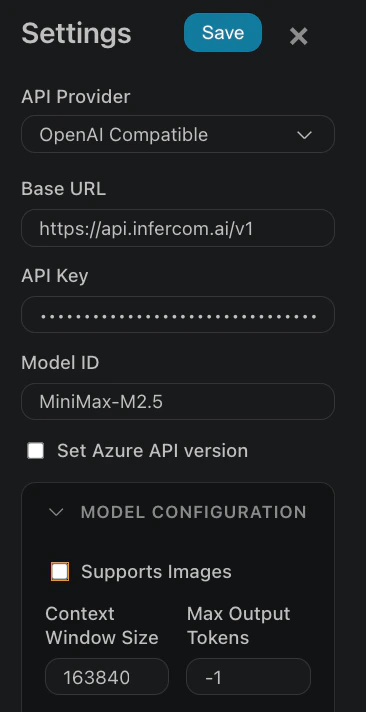
### Step 2: Configure API Provider
In the Settings dialog, enter:
| Field | Value |
| ---------------- | ---------------------------- |
| **API Provider** | `OpenAI Compatible` |
| **Base URL** | `https://api.infercom.ai/v1` |
| **API Key** | Your Infercom API key |
| **Model ID** | `MiniMax-M2.7` |
### Step 3: Configure Model Settings
Expand **MODEL CONFIGURATION** and set:
| Field | Value |
| ----------------------- | ---------------- |
| **Supports Images** | Unchecked |
| **Context Window Size** | `192000` |
| **Max Output Tokens** | `-1` (unlimited) |
### Step 4: Save
Click **Save** to apply the configuration.
 ## Model
Use `MiniMax-M2.7` - optimized for agentic coding with 192K context window.
| Metric | Value |
| ------------------ | --------------- |
| **Context Window** | 192K tokens |
| **Throughput** | 400+ tokens/sec |
| **Reasoning** | Built-in |
## Verification
After setup, test with a simple prompt:
```
Write a Python function to check if a number is prime
```
The response should show MiniMax-M2.7's fast inference (typically under 300ms time-to-first-token).
## Troubleshooting
### "Invalid API Key" error
* Verify your API key at [cloud.infercom.ai](https://cloud.infercom.ai)
* Ensure no extra spaces in the API key field
### "Model not found" error
* Check model ID is exactly `MiniMax-M2.7` (case-sensitive)
* Verify available models: `curl https://api.infercom.ai/v1/models`
### Slow responses
* Check your internet connection
* Infercom API is hosted in EU (Munich) - latency may vary by location
* First request may be slower due to model loading
## Next Steps
* [Cline](/en/agentic-coding/cline) - Autonomous VS Code agent
* [Cursor](/en/agentic-coding/cursor) - Full AI-native IDE
* [Choosing a Tool](/en/agentic-coding/choosing-a-tool) - Compare all options
## Model
Use `MiniMax-M2.7` - optimized for agentic coding with 192K context window.
| Metric | Value |
| ------------------ | --------------- |
| **Context Window** | 192K tokens |
| **Throughput** | 400+ tokens/sec |
| **Reasoning** | Built-in |
## Verification
After setup, test with a simple prompt:
```
Write a Python function to check if a number is prime
```
The response should show MiniMax-M2.7's fast inference (typically under 300ms time-to-first-token).
## Troubleshooting
### "Invalid API Key" error
* Verify your API key at [cloud.infercom.ai](https://cloud.infercom.ai)
* Ensure no extra spaces in the API key field
### "Model not found" error
* Check model ID is exactly `MiniMax-M2.7` (case-sensitive)
* Verify available models: `curl https://api.infercom.ai/v1/models`
### Slow responses
* Check your internet connection
* Infercom API is hosted in EU (Munich) - latency may vary by location
* First request may be slower due to model loading
## Next Steps
* [Cline](/en/agentic-coding/cline) - Autonomous VS Code agent
* [Cursor](/en/agentic-coding/cursor) - Full AI-native IDE
* [Choosing a Tool](/en/agentic-coding/choosing-a-tool) - Compare all options